Mounting external storage on service volumes
This feature enables the mounting of a folder from a storage provider, such as MinIO or dCache, into the service container. As illustrated in the following diagram, the folder is placed inside the /mnt directory on the container volume, thereby making it accessible to the service.
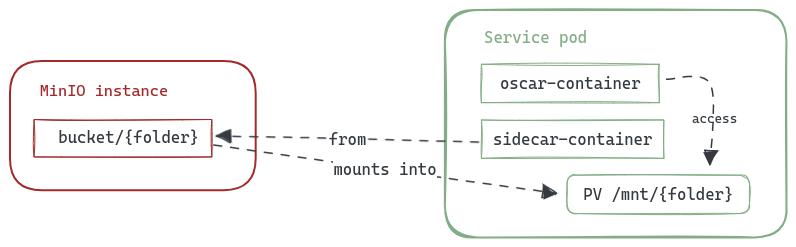
This functionality can be useful with exposed services, such as those using a Jupyter Notebook, to make the content of the storage bucket accessible directly within the Notebook. For instance, if you have a MinIO bucket called notebook you want to access, you would need to add the following parameters to the service definition:
mount:
  storage_provider: minio.default
  path: /notebook
The complete definition of this use case that integrates the expose of a Jupyter Notebook with the access to a mounted bucket would look like the following:
functions:
  oscar:
  - oscar-cluster:
     name: jupyter
     memory: 2Gi
     cpu: '1.0'
     image: jupyter/base-notebook
     script: jupyterscript2.sh
     environment:
       Variables:
         JUPYTER_TOKEN: "root"
         JHUB_BASE_URL: "/system/services/jupyter/exposed"
         JUPYTER_DIRECTORY: "/mnt"
     mount:
       storage_provider: minio.default
       path: /notebook
     expose:
      min_scale: 1
      max_scale: 1
      api_port: 8888
      cpu_threshold: 90
      rewrite_target: true
Additionally, you can pass extra flags to the rclone mount command using the options field:
mount:
  storage_provider: minio.default
  path: /notebook
  options: "--buffer-size 128M --vfs-read-chunk-size 64M"
OSCAR accepts only the following additional flags (as --flag value or --flag=value for flags with values):
| Flag | Value |
|---|---|
--buffer-size, --vfs-read-chunk-size, --vfs-cache-max-size |
Nonnegative integer, optionally followed by K, M, G, or T (case-insensitive), e.g. 128M |
--dir-cache-time, --timeout |
Nonnegative integer followed by ms, s, m, or h, e.g. 30s |
--read-only, --no-checksum |
No value |
Flags and values must be separated by ordinary spaces; quoting, tabs, shell syntax, unknown flags, network/control flags (including --rc), and configuration or provider overrides (including --config) are rejected. The flags above are appended after OSCAR's built-in mount settings. Existing service definitions using any other custom options must remove or replace them before an update; on PodSpec generation, OSCAR drops all custom options from a stored definition if any one is invalid. The default mount settings and mounts without custom options remain unchanged.
Note: You can find the files of this example on OSCAR's repository examples
As OSCAR has the credentials of the default MinIO instance internally, if you want to use a different one or a different storage provider, you need to set these credentials on the service FDL. Currently, the storage providers supported on this functionality are: